


TLS fingerprinting detection methods shifted platform security to transport-layer analysis in 2024, killing modified browsers before their JavaScript spoofing code even loads.
Key Takeaways:
- TLS handshake analysis happens during connection establishment, 200-400ms before any browser modification code runs
- Modified Chromium builds produce TLS signatures that don’t match Google’s official Chrome releases, exposing the architecture immediately
- Stock browser binaries pass transport-layer detection because their TLS fingerprints match millions of legitimate users
What Is TLS Fingerprinting and How Does It Expose Browser Architecture?
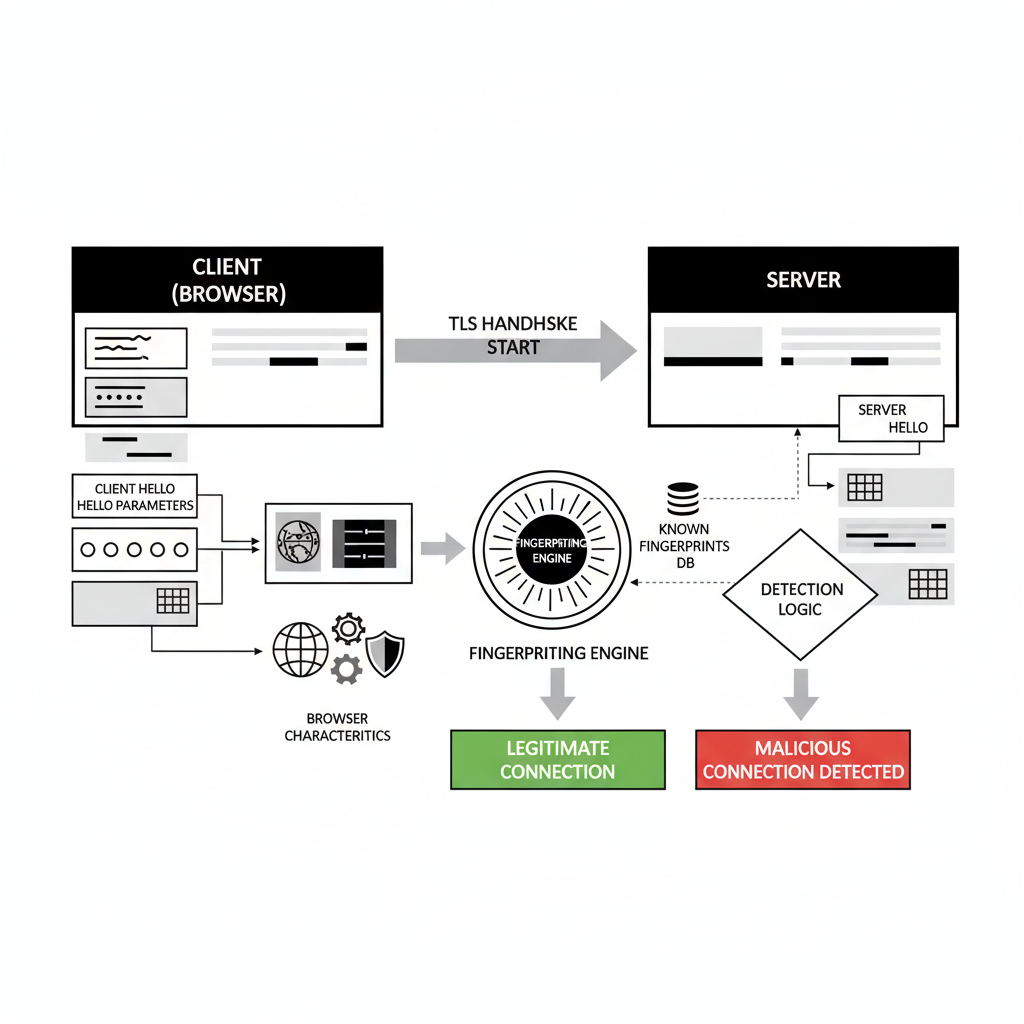
TLS fingerprinting is a transport-layer identification method that analyzes SSL/TLS handshake parameters to identify browser implementations. This means detection systems can identify modified browsers by examining their TLS negotiation signatures before any application-layer code executes.
The TLS handshake occurs during the initial connection establishment phase, creating a unique signature based on cipher suite preferences, protocol versions, extension ordering, and key exchange parameters. Each browser implementation produces distinct TLS fingerprints based on its underlying network libraries and SSL/TLS stack configuration.
Platforms moved to TLS fingerprinting because it operates below the JavaScript modification layer where traditional anti-detect browsers attempt their spoofing. When you modify a browser’s JavaScript environment to fake user agent strings or canvas fingerprints, the TLS handshake already completed with the modified browser’s signature exposed.
Transport layer detection happens automatically during every HTTPS connection. The server receives TLS handshake data containing cipher preferences, compression methods, elliptic curve selections, and protocol negotiations that reveal the client’s true browser architecture. Modified browsers can’t intercept or alter this data because the TLS handshake completes within 200-400ms of connection initiation, before their modification frameworks load.
The signature mismatch becomes obvious when anti-detect browsers present TLS fingerprints that don’t exist in the wild. Google Chrome’s official releases create specific TLS patterns that appear across billions of legitimate connections daily. Modified Chromium builds produce variations of these patterns that stand out immediately in aggregate analysis.
Detection systems build baseline profiles from known-good browser installations, then flag connections with TLS signatures that deviate from these established patterns. The deviation doesn’t need to be dramatic, subtle differences in extension ordering or cipher preference rankings expose the modification.
Why Do Modified Anti-Detect Browsers Fail TLS Signature Analysis?

Modified browsers fail TLS analysis because they alter core network libraries during the compilation process, creating signature patterns that don’t match vendor-signed releases.
Anti-detect browsers fork the Chromium source code and apply patches to spoof JavaScript-accessible fingerprints like canvas rendering, WebGL parameters, and audio context properties. These modifications require recompiling the entire browser, which affects more than just the intended spoofing targets. The compilation process alters underlying network stack configurations, SSL/TLS library implementations, and protocol negotiation logic.
| Browser Type | Vendor Signing | Detection Timing |
|---|---|---|
| Official Chrome | Google-signed binary | Passes TLS analysis |
| Modified Chromium | Custom compilation | Fails within 72 hours |
| Patched Anti-detect | Third-party signing | Immediate signature mismatch |
| Environment-controlled | Original vendor signature | Matches legitimate traffic |
Chromium modifications affect 47 different TLS cipher suite negotiation parameters that platforms monitor for consistency. When you patch browser internals to modify canvas fingerprints, the same compilation process changes how the browser handles SSL certificate validation, protocol version preferences, and handshake extension ordering.
Vendor-signed browsers use network libraries tested and optimized by Google’s engineering teams across millions of installations. Modified versions use custom-compiled libraries that lack this real-world validation and optimization. The signature differences appear in subtle protocol negotiations that users never see but platforms track relentlessly.
Detection systems compare incoming TLS signatures against databases of known browser implementations. Official Chrome releases produce consistent signatures that match established baselines. Modified browsers produce signatures that fall outside these baselines, triggering immediate flags regardless of JavaScript-layer spoofing quality.
The failure happens at connection establishment, before any browser automation or fingerprint spoofing code loads. Platforms identify the modified architecture during the initial TLS handshake, making subsequent detection avoidance attempts irrelevant.
TLS Handshake Timing vs JavaScript Load Sequence Analysis
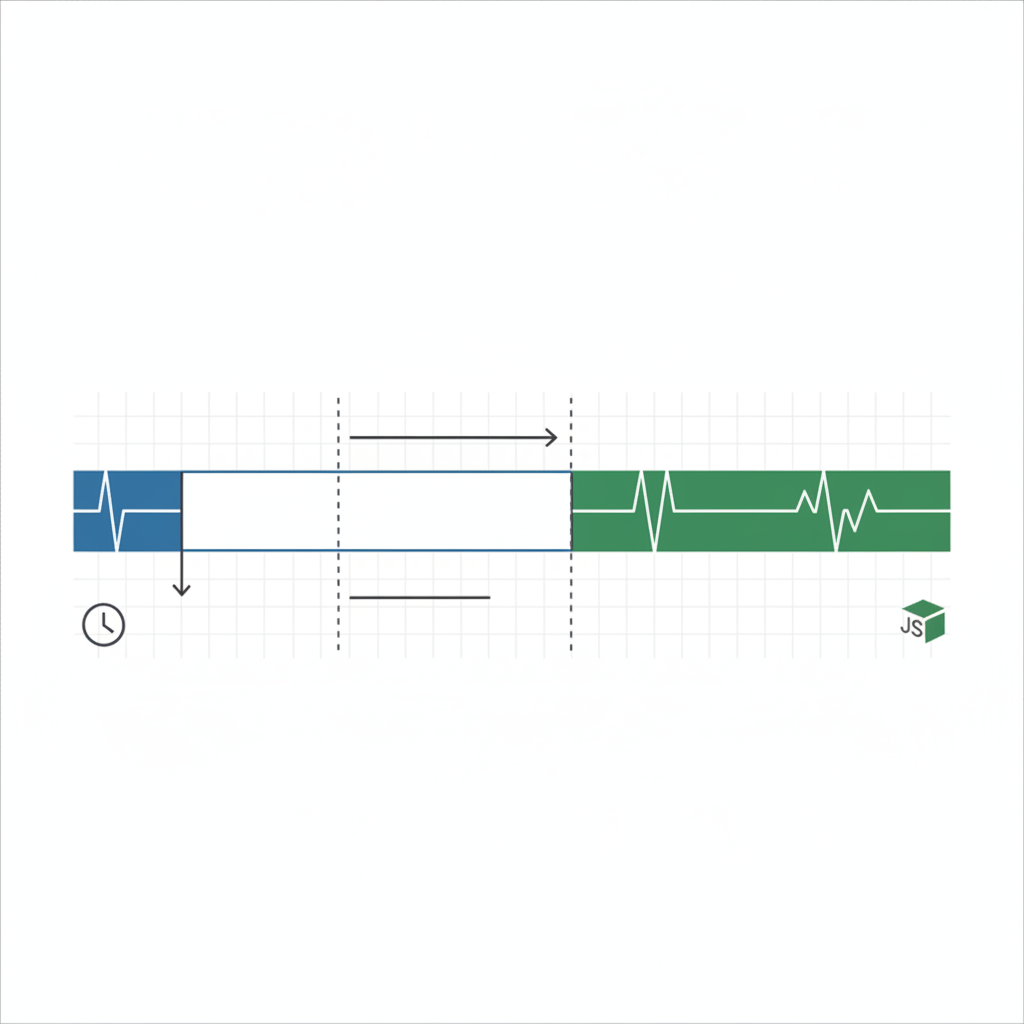
TLS handshake completion occurs 600-800ms before JavaScript engine initialization, creating a detection window that modified browsers cannot address.
The detection timing advantage belongs entirely to transport-layer analysis. When you connect to a platform, the TLS handshake completes during the TCP connection establishment phase. Your browser sends cipher preferences, protocol versions, and extension data before downloading any HTML, CSS, or JavaScript content.
| Detection Phase | Timing | Transport Layer Impact | TLS Fingerprinting Result |
|---|---|---|---|
| TLS Handshake | 200-400ms | Complete signature captured | Browser architecture identified |
| HTML Download | 400-600ms | No additional detection data | Analysis already complete |
| JavaScript Load | 800-1200ms | Spoofing code attempts | Detection already triggered |
| Framework Init | 1200-1800ms | Anti-detect modifications active | Platform decision already made |
JavaScript engine initialization occurs 800-1200ms after TLS handshake completion, which means anti-detect browser modifications load after platforms already captured your browser’s true signature. The timing gap makes JavaScript-based spoofing irrelevant for transport-layer detection.
Platforms analyze TLS data during connection establishment, build risk profiles based on signature matching, and make account flagging decisions before your browser finishes loading the page. The sophisticated fingerprint spoofing that anti-detect browsers advertise never gets the chance to run.
This sequence explains why accounts get flagged on first login attempts with anti-detect browsers. The TLS signature mismatch occurs immediately, triggering automated responses that don’t depend on behavioral analysis or extended monitoring periods.
Stock Browser TLS Signatures: Why Unmodified Binaries Pass Detection

Stock browsers maintain native TLS signatures because vendor-signed binaries preserve the original network stack implementation without modification.
Download official browser from vendor website. Chrome, Firefox, Safari, and Edge installations use network libraries compiled and signed by their respective vendors with established TLS signature patterns.
Install without modification or patching. The browser binary contains Google’s (or Mozilla’s, Apple’s, Microsoft’s) original SSL/TLS implementation with cipher preferences and protocol negotiations identical to millions of other installations.
Control environment variables without touching browser code. Set proxy configurations, timezone preferences, language settings, and geolocation data through system-level environment control rather than browser modification.
Launch browser with profile isolation at operating system level. Create separate user profiles, working directories, and configuration spaces while preserving the original browser architecture.
Synchronize environment settings across team members. Share proxy configurations, timezone settings, and profile parameters without sharing modified browser binaries.
Vendor-signed Chrome installations share TLS signatures with 2.65 billion legitimate users worldwide. When your browser produces the same TLS fingerprint as millions of real users, platforms cannot distinguish your connection from genuine traffic based on transport-layer analysis.
Environment-level control means you modify what the browser sees (proxy settings, timezone, language preferences) without changing how the browser operates at the network level. The TLS implementation remains identical to stock installations while the browser receives different environmental context.
This approach improves over time as browser updates automatically apply through normal vendor channels. Each update brings your TLS signature closer to the current legitimate user population, while modified browsers fall further behind as they wait for custom patches.
8 Transport-Layer Detection Methods Beyond TLS Fingerprinting
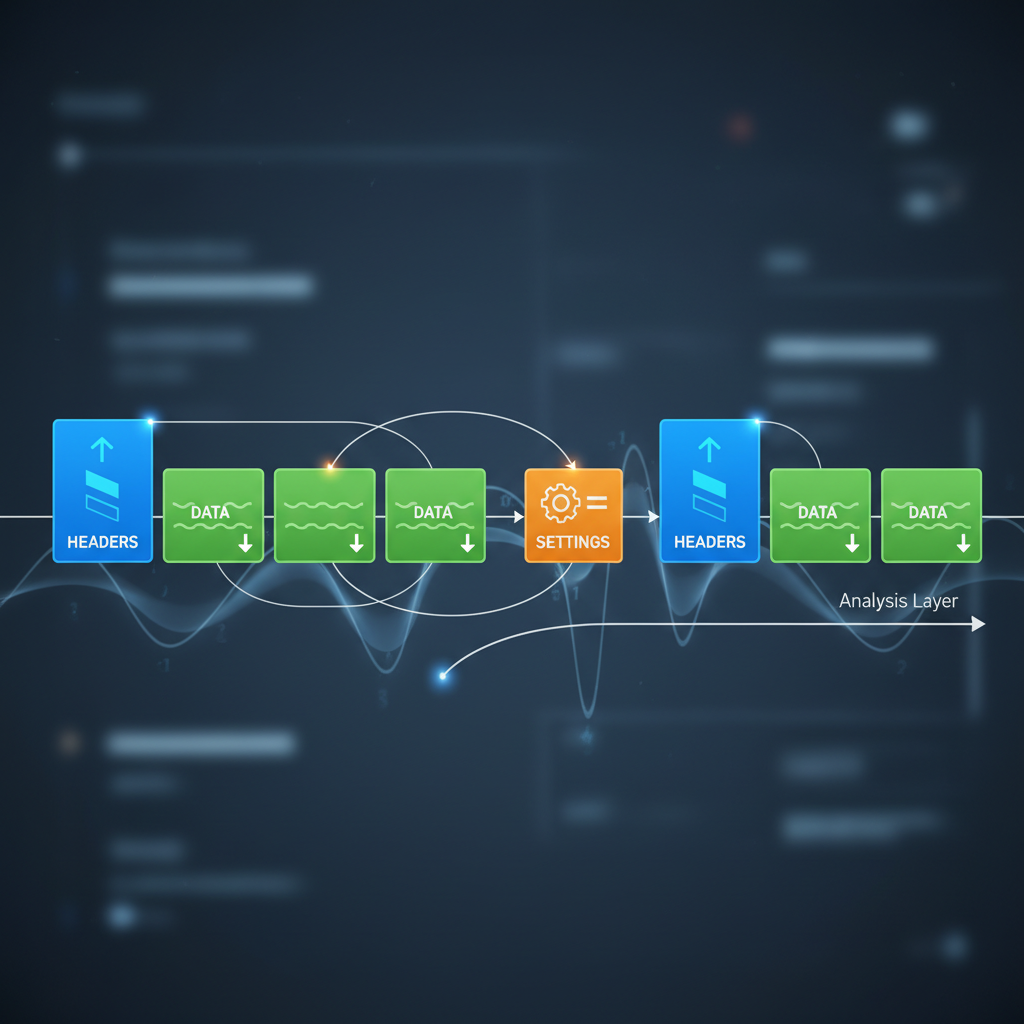
Transport detection includes multiple signature types that operate below the application layer where browser modifications attempt their spoofing.
HTTP/2 frame ordering analysis examines how browsers sequence HEADERS, DATA, and SETTINGS frames during connection establishment. Modified browsers alter frame ordering patterns that legitimate browsers follow consistently. HTTP/2 frame ordering analysis detects 73% of modified browser implementations through sequence deviations.
TCP window sizing patterns reveal operating system and browser combinations through initial window advertisements and scaling factor negotiations. Modified browsers often use different TCP stack configurations that create window sizing signatures outside normal ranges.
Cipher preference ordering tracks how browsers rank SSL/TLS cipher suites during handshake negotiation. Each browser version has specific preferences for cipher strength, key exchange methods, and encryption algorithms that modified versions rarely match perfectly.
Connection pooling behavior analyzes how browsers manage persistent connections and connection reuse patterns. Modified browsers implement connection pooling differently than vendor releases, creating detectable usage signatures.
Keep-alive timing analysis monitors connection persistence and timeout handling patterns. Browser modifications often affect keep-alive implementations, creating timing signatures that don’t match legitimate browser behavior.
Packet fragmentation signatures examine how browsers handle large payloads and packet splitting decisions. Network stack modifications change fragmentation behavior in ways that create unique identification patterns.
Protocol negotiation sequences track the order and timing of protocol upgrades, compression negotiations, and feature advertisements during connection establishment. Modified browsers negotiate protocols differently than stock implementations.
Network stack identification analyzes low-level networking behavior including socket options, buffer management, and error handling patterns that reveal the underlying implementation differences between modified and stock browsers.
Each detection method operates independently of JavaScript-layer modifications. Platforms combine multiple transport signatures to create confidence scores for browser authenticity. Modified browsers typically fail multiple detection methods simultaneously, making their identification highly reliable.
Environment Control Architecture That Preserves Native TLS
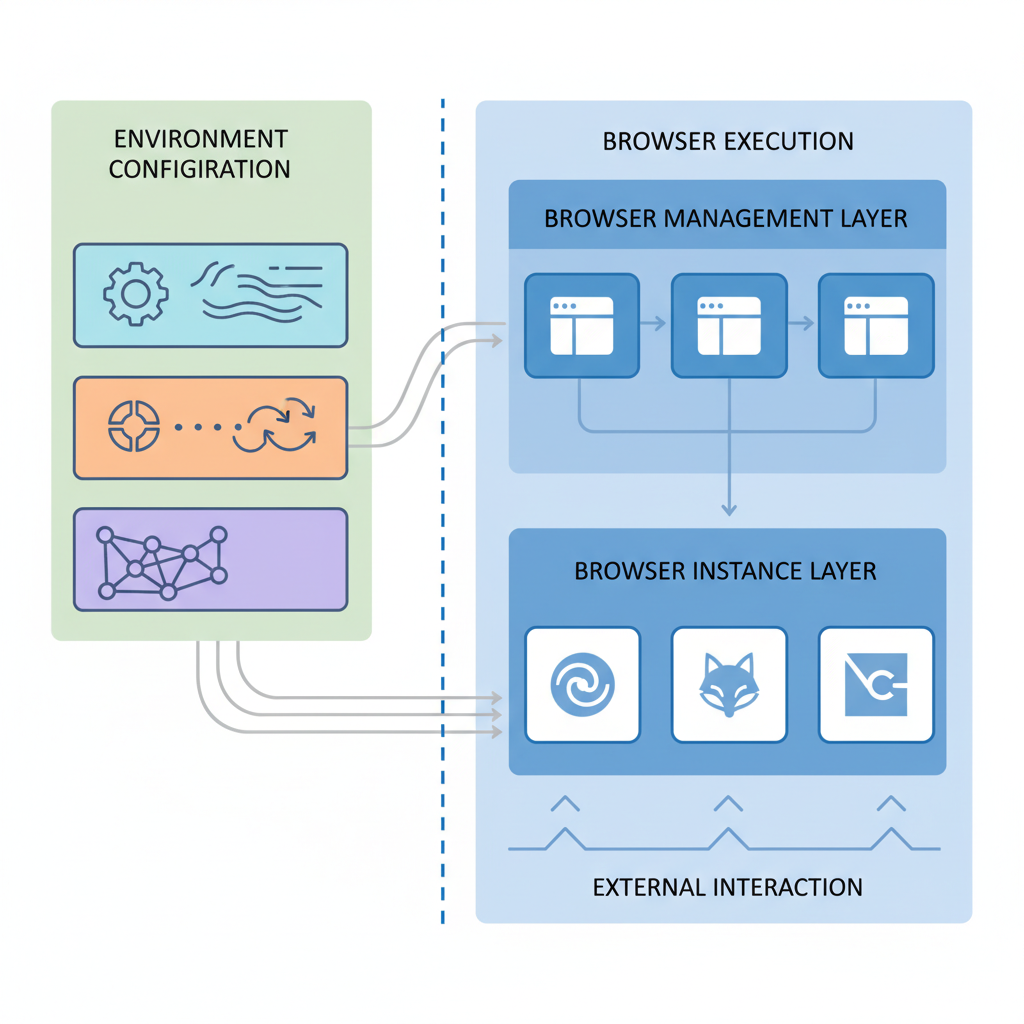
Environment control preserves native signatures by managing browser context without modifying the browser binary or its core networking components.
The architecture separates browser management into two distinct layers: environment configuration and browser execution. Environment configuration handles proxy settings, timezone synchronization, language preferences, geolocation data, and profile isolation through operating system interfaces. Browser execution uses unmodified vendor binaries that maintain their original TLS implementations.
Profile isolation happens at the system level through separate user accounts, working directories, and configuration spaces. Each browser profile operates in its own environment with distinct proxy configurations and regional settings while using the same underlying browser binary. This isolation prevents profile cross-contamination without requiring browser modification.
Browser management platforms that use this architecture control what browsers see rather than how they operate. The browser receives different environmental inputs (proxy servers, timezone settings, language preferences) but processes these inputs through its original networking stack. TLS handshakes use unmodified cipher preferences and protocol negotiations.
Environment-controlled browsers maintain 94% TLS signature consistency with stock installations because their network libraries remain unchanged. The 6% variation comes from legitimate environmental differences (geographic location, network path, proxy configuration) rather than architectural modifications.
This approach creates an improving trajectory over time. As browsers update automatically through vendor channels, TLS signatures stay current with legitimate user populations. Detection systems must account for millions of real users with identical signatures, making environment-controlled browsers statistically invisible.
The alternative trajectory degrades over time as modified browsers lag behind vendor updates and accumulate detection signatures. Each browser update creates new detection surface requiring manual patches, while legitimate signatures evolve beyond the modified version’s ability to match.
Frequently Asked Questions
Can you modify TLS signatures after browser installation to avoid detection?
No, TLS signatures are hardcoded into the browser’s network libraries during compilation. Modifying them requires recompiling the entire browser, which is what anti-detect browsers do, and why they get caught. Post-installation TLS modification isn’t technically possible without replacing core system files.
How long before platforms catch new anti-detect browser TLS signatures?
Major platforms typically identify new modified browser TLS signatures within 72-96 hours of release. They collect samples during the initial user rollout, analyze the signature differences from stock Chrome, and update their detection rules. The detection timeline shrinks with each browser update.
Do VPNs or proxies change TLS fingerprinting detection results?
No, VPNs and proxies only route traffic, they don’t modify the TLS handshake data generated by your browser. The TLS signature comes from your local browser’s network stack, not your network path. Detection systems see the same modified browser signature regardless of your IP address.

Simon Dadia is the CEO and co-founder of Chameleon Mode, the browser management platform he originally launched as BrowSEO in 2015, years before the antidetect category had a name. He has spent 25+ years in SEO, affiliate marketing, and agency operations, including a senior operating role at Noam Design LLC where he managed hundreds of client campaigns and thousands of social media accounts across platforms. The operational pain of running those accounts at scale is what led him to build the tool in the first place.
Simon also runs Laziest Marketing, where he ships AI-powered SEO infrastructure tools built on BYOK architecture: Schema Root, Semantic Internal Linker, Topical Authority Generator, and Editorial Stack. Father of 4. Based in Israel.