


Key Takeaways
- Browser detection now happens at the transport layer—before JavaScript even runs. By the time your page loads, platforms have already evaluated your browser’s TLS handshake, HTTP/2 behavior, and protocol signatures.
- Modified browsers fail because they can’t fake transport-layer signals. A patched Chromium build has a different TLS fingerprint than stock Chrome. Detection systems see this immediately.
- Randomization is a red flag, not a solution. Real users are consistent. Their devices don’t morph every session. Detection systems are trained on normal behavior—anomalies get flagged.
- The detection stack has four layers: transport, browser signals, JavaScript APIs, and behavioral analysis. Each layer cross-references the others for consistency.
- Authenticity beats deception. The trajectory of detection favors real browsers with environment-level control over modified browsers attempting to spoof signals.
How Browser Detection Actually Works
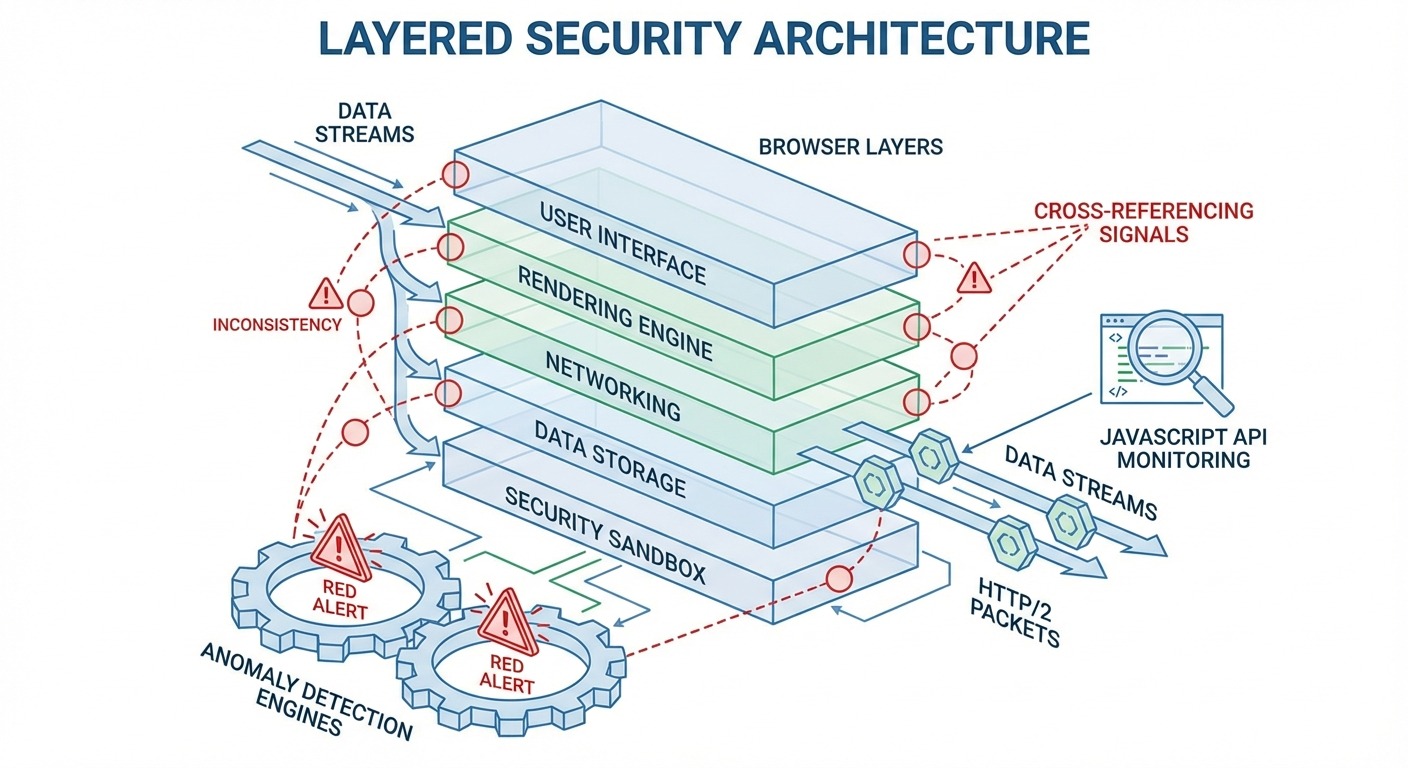
Browser detection evaluates your browser across multiple layers simultaneously, cross-referencing signals to identify inconsistencies and anomalies that distinguish real users from automated or modified systems.
Most people think detection means “they check my user agent string.” That was true in 2010. It’s laughably incomplete now.
Modern browser detection operates like airport security with multiple checkpoints. You don’t just pass one gate. You pass a dozen, and they all share notes. Fail any checkpoint—or show inconsistent information between checkpoints—and you’re flagged before you reach the gate.
Here’s what changed: detection moved earlier in the connection process. Platforms don’t wait for your JavaScript to run anymore. They evaluate your browser the moment you attempt to connect.
The Three Eras of Detection
Era 1: Cookies and IP (1995-2010)
Simple tracking. Drop a cookie, read it later. Block cookies or change IPs, you’re “new.” This era is dead.
Era 2: JavaScript Fingerprinting (2010-2020)
anvas fingerprinting,, WebGL enumeration, font detection. Sophisticated, but still happens after page load. This is what most people still think detection means.
Era 3: Transport-Layer Detection (2020-Present)
Evaluation at the TLS handshake, before JavaScript runs. This is where the game changed—and where most evasion tools are failing.
The Detection Stack
| Layer | What It Evaluates | When It Runs |
|---|---|---|
| Transport (TLS/HTTP/2) | Protocol behavior, cipher suites, handshake patterns | Before page load |
| Browser Signals | Client hints, user agent, headers | During request |
| JavaScript APIs | Canvas, WebGL, AudioContext, fonts | After page load |
| Behavioral | Mouse movement, typing, session patterns | Throughout session |
Each layer doesn’t just collect data—it cross-references against the others. Your TLS fingerprint says Chrome 120. Your user agent says Chrome 120. Your client hints say Chrome 120. Your canvas fingerprint matches Chrome 120 on your reported GPU. Everything aligns.
Or it doesn’t. And that’s the problem.
Transport-Layer Browser Detection: The Invisible Checkpoint
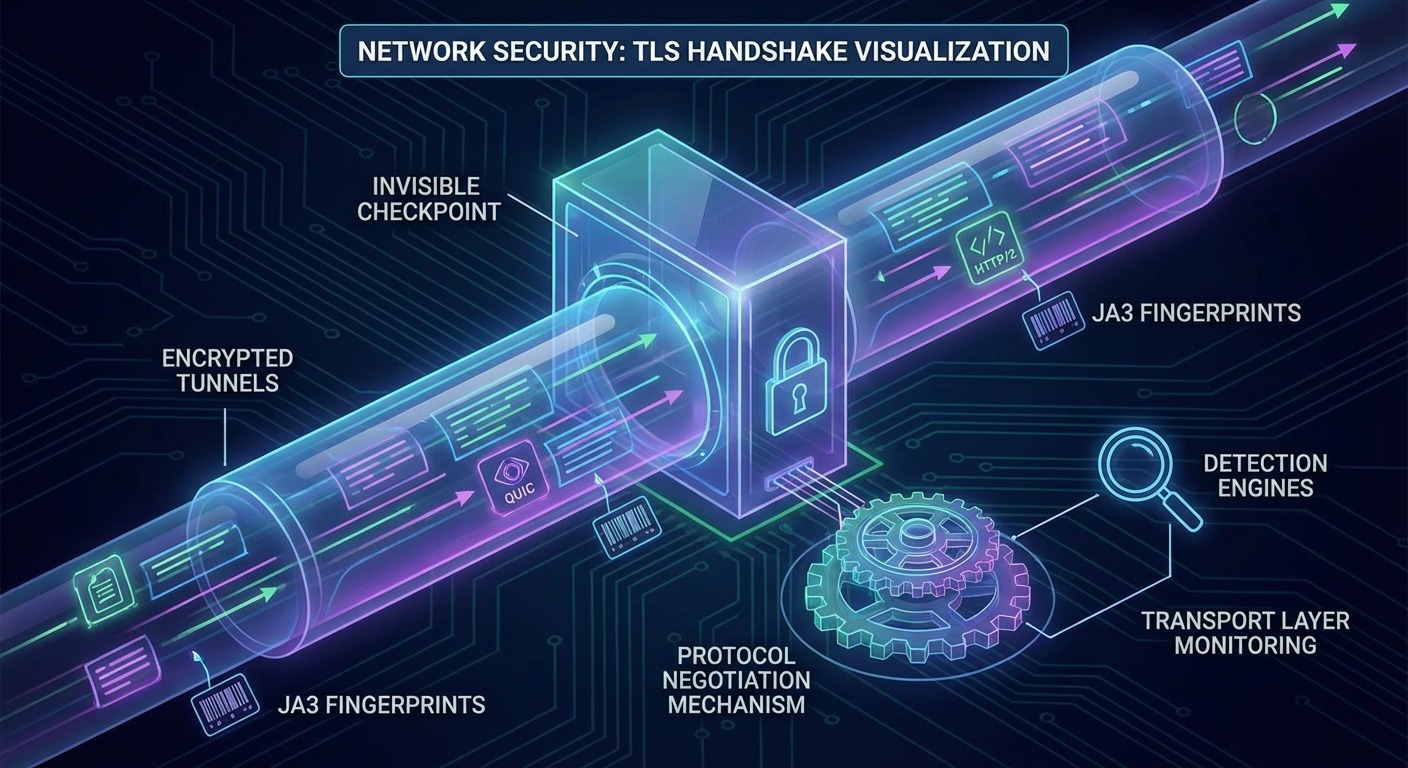
Transport-layer detection evaluates your browser during the TLS handshake—before your page loads, before JavaScript executes, before you can run any spoofing code.
This is the shift that broke most anti-detect tools. They focused on JavaScript-level fingerprint spoofing. Meanwhile, detection moved upstream.
TLS Fingerprinting (JA3/JA3S)
When your browser initiates a secure connection, it sends a ClientHello message. This message contains:
- Supported cipher suites (and their order)
- TLS extensions (and their order)
- Supported groups and signature algorithms
- ALPN protocols
JA3 fingerprinting hashes these values into a unique identifier. Stock Chrome 120 on Windows produces one JA3 hash. Stock Chrome 120 on macOS produces a slightly different one. Firefox produces entirely different values.
Here’s the problem: modified Chromium browsers don’t produce the same JA3 hash as stock Chrome.
When you fork Chromium and patch it, you change the binary. Even small changes affect the TLS stack behavior. The cipher suite order might shift. Extension handling might differ. These changes are subtle—but they’re detectable.
A detection system sees your user agent claim “Chrome 120.” Then it sees a TLS fingerprint that doesn’t match any known Chrome 120 build. Inconsistency flagged.
HTTP/2 and QUIC Behavior
Protocol negotiation creates another fingerprint surface.
HTTP/2 uses SETTINGS frames to negotiate connection parameters. Values like SETTINGS_HEADER_TABLE_SIZE, SETTINGS_MAX_CONCURRENT_STREAMS, and SETTINGS_INITIAL_WINDOW_SIZE vary by browser. Stock Chrome sends specific values. Firefox sends different values. Modified browsers often send anomalous values—or stock values that don’t match their claimed identity.
QUIC (HTTP/3) adds additional signals. Connection migration behavior, packet pacing, congestion control—these create observable patterns tied to specific browser implementations.
Why This Layer Matters Most
Transport-layer browser detection has one critical advantage: it happens before your code runs.
JavaScript-based fingerprint spoofing only works if your JavaScript executes first. But TLS evaluation happens during the connection handshake. Your browser has already been fingerprinted before the server even sends the HTML.
You can’t spoof signals that are collected before your spoofing code loads. This is the fundamental problem with modified browser approaches—they’re defending a checkpoint that detection systems have already bypassed.
Browser-Level Signals and Detection
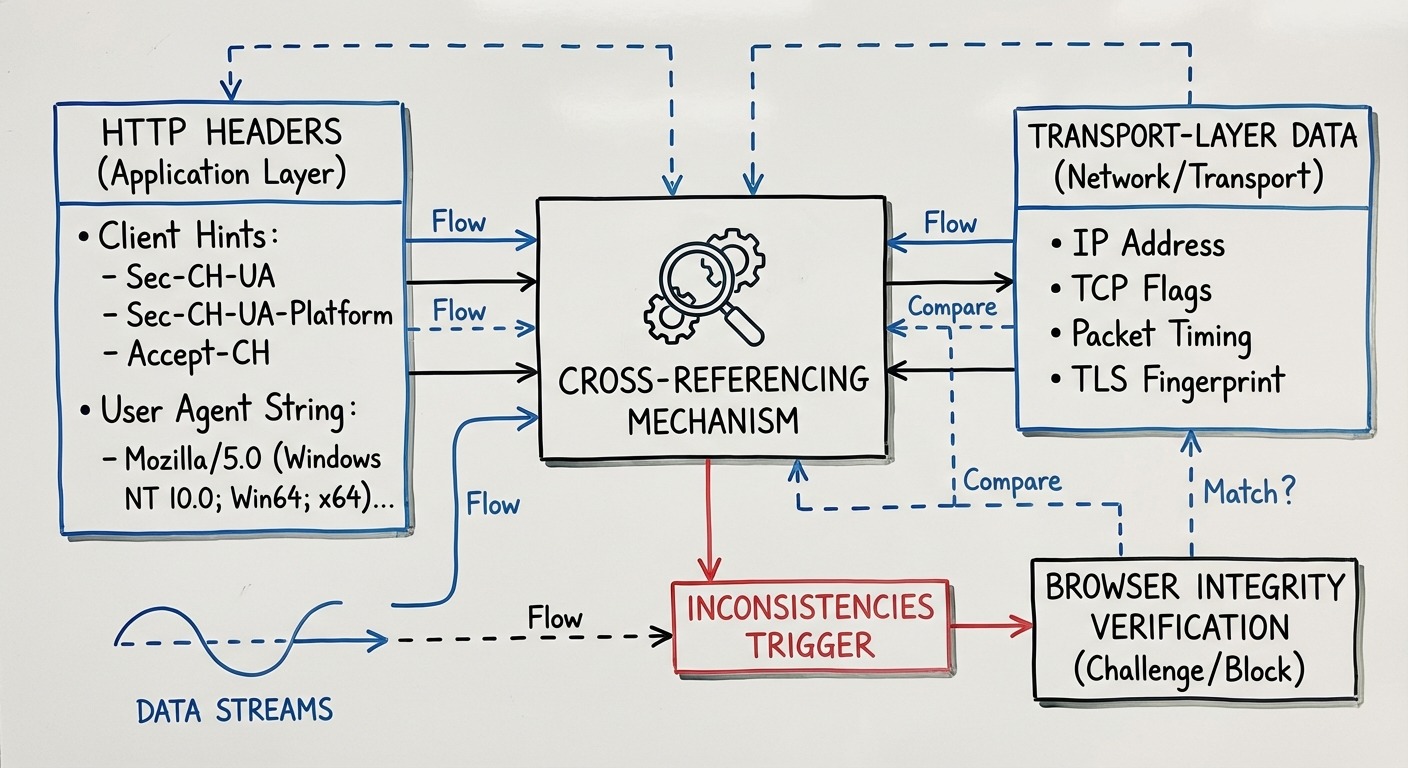
Browser-level signals like Client Hints and User Agent strings are cross-referenced against transport-layer data and JavaScript APIs to detect inconsistencies that reveal modified browsers.
This layer sits between transport and JavaScript. It’s the HTTP headers your browser sends with every request.
Client Hints and Sec-CH-UA
Client Hints are structured headers that replace the chaotic user agent string with machine-readable data:
Sec-CH-UA: "Chromium";v="120", "Google Chrome";v="120"
Sec-CH-UA-Platform: "Windows"
Sec-CH-UA-Mobile: ?0
These values must be consistent with everything else. Your Sec-CH-UA says Chrome 120. Your transport fingerprint must match Chrome 120. Your JavaScript navigator object must report Chrome 120. Your canvas fingerprint must be plausible for Chrome 120 on your reported platform.
Modified browsers struggle here. They can set the header values, but those values get cross-checked against signals they can’t control.
Browser Build Integrity
Major platforms can verify browser binary integrity. Vendor-signed builds (Chrome from Google, Edge from Microsoft) pass integrity checks. Modified builds don’t.
This isn’t theoretical. Google’s attestation APIs, for instance, can verify that the requesting browser is an unmodified, vendor-signed build. A forked Chromium binary—regardless of how sophisticated its fingerprint spoofing—fails this check.
JavaScript Fingerprinting Methods

JavaScript fingerprinting collects dozens of signals from browser APIs, creating composite identifiers from canvas rendering, WebGL output, audio processing, and system characteristics.
This is the layer everyone knows about. It’s also the layer everyone over-focuses on.
Canvas Fingerprinting
Canvas fingerprinting works by drawing invisible graphics and reading the result. The same drawing code produces slightly different pixel data on different hardware/software combinations.
- Create an off-screen canvas
- Draw text, shapes, and gradients
- Extract the raw pixel data
- Hash the result
The output depends on:
- GPU and graphics driver
- Font rendering engine
- Anti-aliasing implementation
- Operating system
Two “identical” setups can produce different canvas fingerprints. Two different setups occasionally produce matching fingerprints. Canvas alone isn’t conclusive—but combined with other signals, it’s powerful.
WebGL Fingerprinting
WebGL exposes your GPU more directly:
- Renderer string: The actual GPU identifier (e.g., “ANGLE (NVIDIA GeForce RTX 3080)”)
- Vendor string: The GPU manufacturer
- Supported extensions: Which WebGL features your hardware supports
- Parameter values: Various limits and capabilities
This data is hard to spoof convincingly. Claiming an RTX 3080 while having WebGL parameter limits that don’t match RTX 3080 capabilities creates obvious inconsistency.
AudioContext Fingerprinting
Audio processing creates fingerprints through:
- Generate a tone using OscillatorNode
- Process it through DynamicsCompressorNode
- Read the output values
- Hash the result
Audio processing varies by hardware and software audio stack. Like canvas, it’s not uniquely identifying alone—but it’s another signal in the correlation matrix.
Additional JavaScript Signals
| Signal | What It Reveals |
|---|---|
| Screen resolution & color depth | Display characteristics |
| Hardware concurrency | CPU core count |
| Device memory | RAM amount (approximated) |
| Timezone | Geographic location hint |
| Language settings | Locale preferences |
| Installed fonts | Software environment |
| Plugin enumeration | Browser modifications |
None of these are individually damning. But they must all be consistent with each other and with the transport/browser layers. Claiming Windows but having macOS font rendering. Claiming 8 cores but having WebGL parameters inconsistent with 8-core systems. These inconsistencies accumulate.
Behavioral and Correlation Analysis
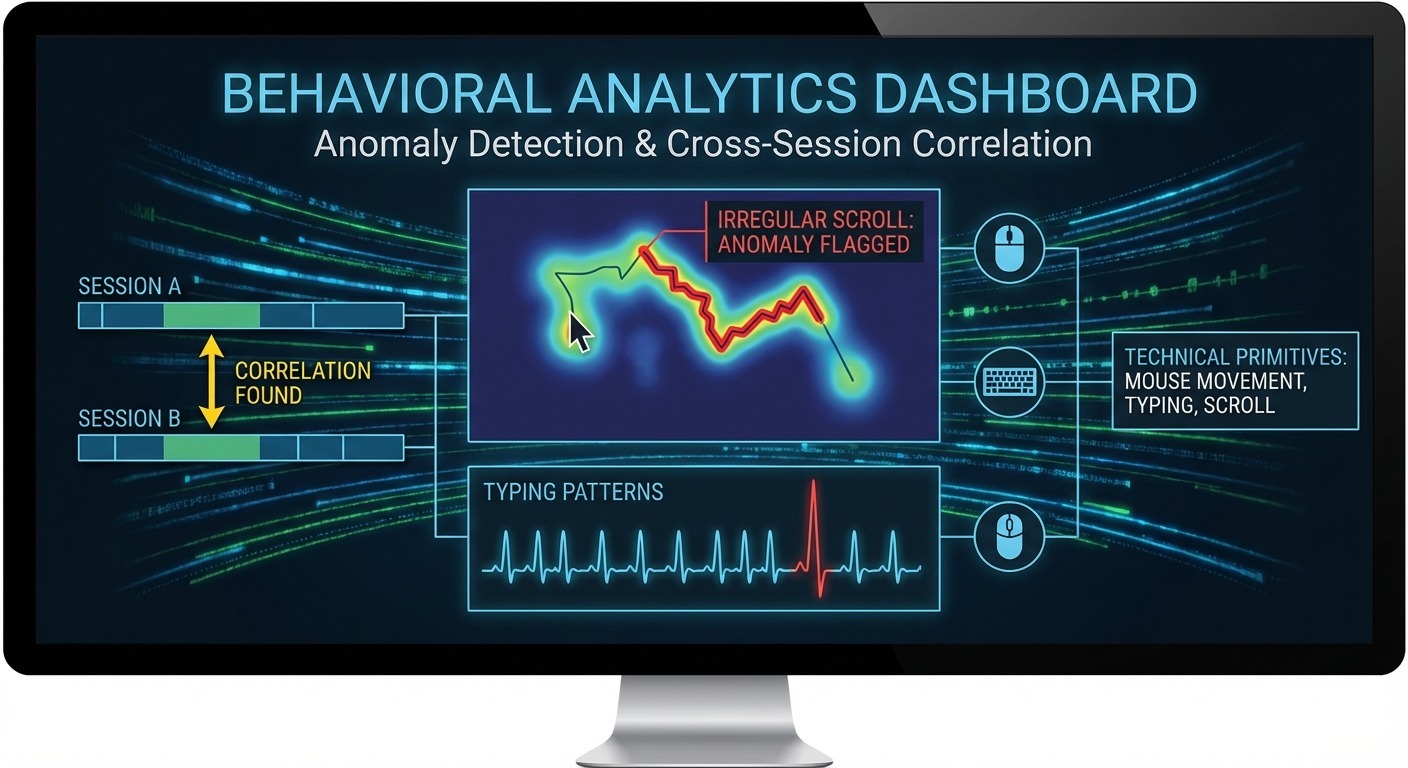
Behavioral analysis tracks how you interact with pages—mouse movements, typing patterns, scroll behavior—to distinguish human users from automation and to correlate sessions over time.
Signals are just the first phase. Platforms also watch what you do.
Session Behavior Patterns
Automated tools behave differently than humans:
- Mouse movement: Humans have natural jitter and curves. Automation often moves in straight lines or with mechanical precision.
- Typing patterns: Humans have variable inter-keystroke timing. Bots often type at consistent speeds.
- Scroll behavior: Humans scroll irregularly, pause to read, jump around. Automation scrolls smoothly or in predictable chunks.
These behavioral signals don’t immediately flag accounts. They feed into risk scores that influence how other signals are weighted.
Cross-Session Correlation
Here’s where consistency becomes critical.
Platforms track patterns across sessions. They see that “User A” always connects from the same timezone, has consistent hardware fingerprints, and exhibits similar behavioral patterns. This builds a trust profile.
Now imagine “User B” appears with a completely different fingerprint every session. Different canvas hash. Different timezone. Different screen resolution. Even if each individual session looks “legitimate,” the inconsistency is itself a signal.
Real users are consistent. Their devices don’t morph. Detection systems are trained on this reality.
Statistical Anomaly Detection
Modern browser detection uses machine learning trained on millions of normal users. The training data establishes what “normal” looks like:
- Normal TLS fingerprint distribution
- Normal canvas fingerprint clusters
- Normal behavioral patterns
- Normal consistency across sessions
Anything that deviates statistically from normal gets flagged. You don’t need to fail a specific check—you just need to be implausible.
The irony: many fingerprint randomization tools make users more detectable, not less. Randomization produces statistical anomalies. “I’ve never seen this combination of signals before” is a red flag, not camouflage.
Why Browser Detection Is Getting More Effective
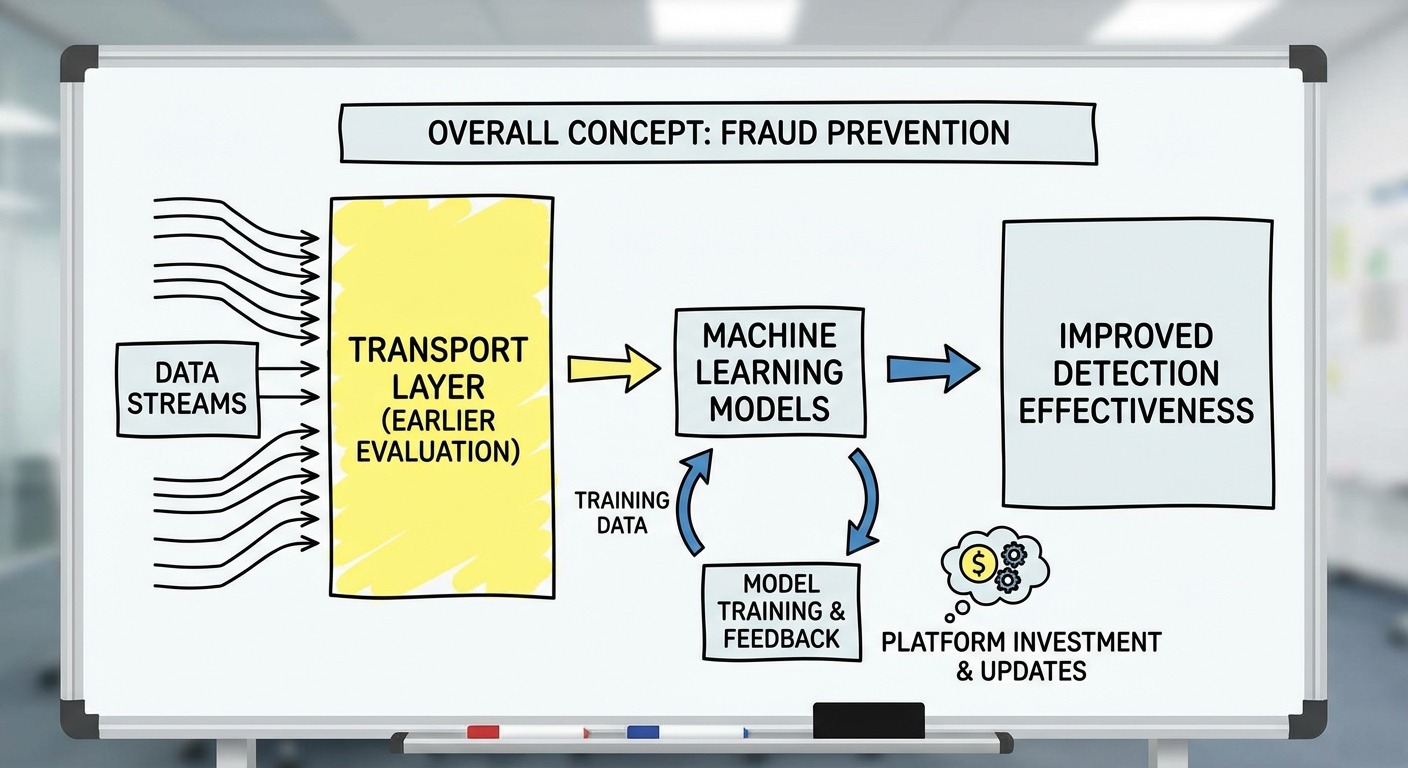
Detection effectiveness improves continuously through earlier evaluation (transport layer), larger training datasets, and significant platform investment in fraud prevention.
If you’re experiencing higher account burn rates than two years ago, it’s not your imagination. Detection is genuinely improving.
The Shift to Transport Layer
Earlier evaluation = harder evasion. When detection happened at the JavaScript layer, you could intercept and modify signals before they were read. When detection happens at the TLS handshake, there’s nothing to intercept.
This shift represents a fundamental architectural advantage for detection systems. They moved the checkpoint upstream.
Machine Learning Improvements
Detection models improve with:
- More training data: Every user interaction adds to the dataset
- Better feature engineering: New signals get incorporated
- Improved anomaly detection: Subtler inconsistencies get caught
These models don’t have static rules. They learn. What worked to evade detection in 2023 may not work in 2025 because the models have adapted.
Platform Investment
Major platforms invest heavily in detection:
- Fraud costs billions annually
- Detection quality is competitive advantage
- Dedicated teams continuously improve systems
This isn’t a static target. It’s an adaptive adversary with significant resources.
Implications for Multi-Account Management
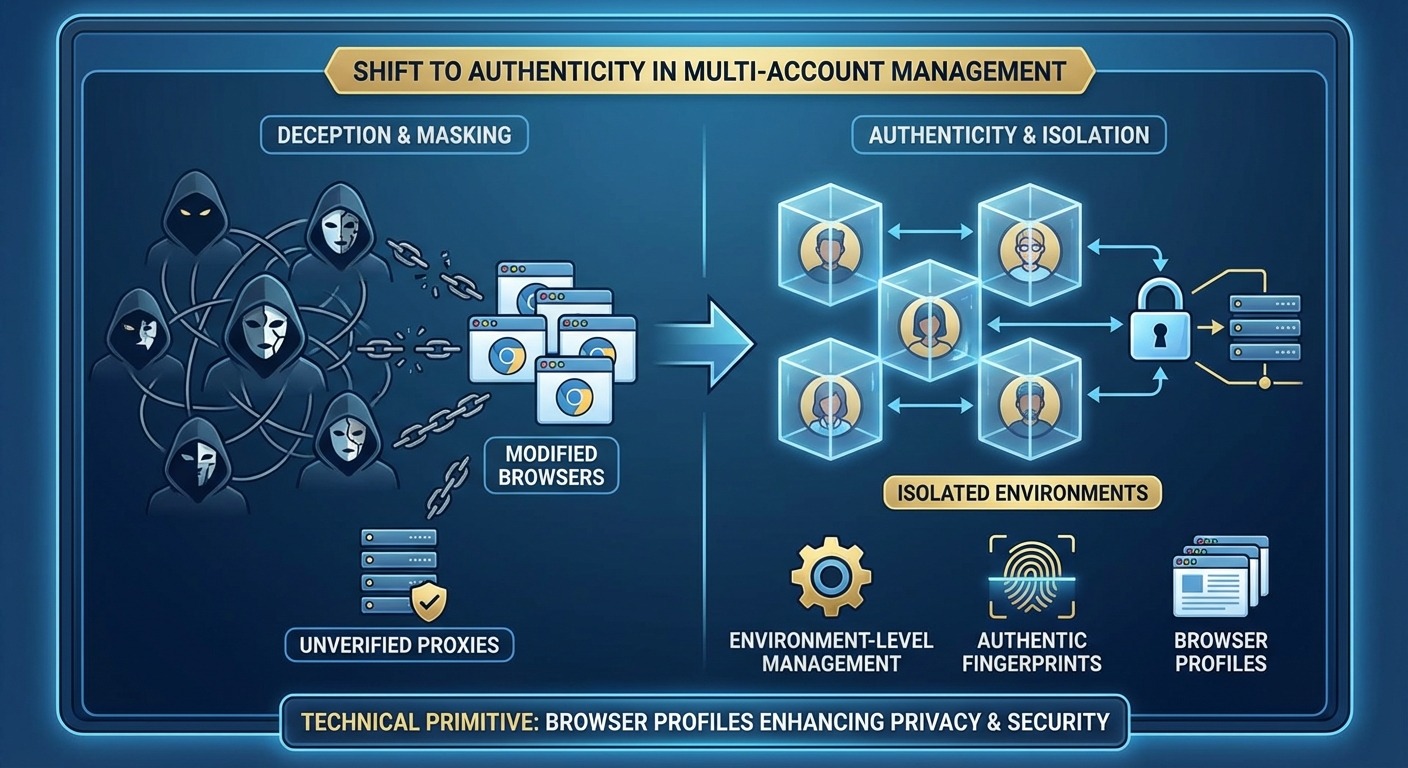
Multi-account management increasingly requires authenticity over deception—using real, unmodified browsers with environment-level control rather than modified browsers attempting to spoof detection signals.
If you manage multiple accounts, the detection evolution matters directly.
Why Traditional Approaches Are Struggling
Modified browser approaches worked when detection focused on JavaScript-level fingerprints. You could patch the browser to report different values.
That’s not where detection happens anymore.
Modified Chromium browsers:
- Have TLS fingerprints that don’t match stock Chrome
- Fail browser integrity checks
- Require constant patching as Chrome updates
- Create statistical anomalies through their modifications
The approach is fighting upstream. Every Chrome update creates new work. Every detection improvement creates new failures.
What Actually Works
The detection shift points toward a different approach:
| Failing Approach | Working Approach |
|---|---|
| Modify the browser | Control the environment |
| Spoof fingerprints | Use authentic fingerprints |
| Randomize signals | Maintain consistency |
| Fight detection | Align with detection |
Environment control means: use a real, unmodified browser. Manage the context around it—proxies, geographic settings, profile isolation. The browser stays authentic because it is authentic.
The Two Architectural Approaches
Modified browser approach: Fork Chromium, patch internals, spoof signals at every layer. This requires constant maintenance and degrades as detection improves.
Real browser approach: Use stock browsers with environment-level management. The browser passes all checks because there’s nothing modified to detect. This improves as browsers receive automatic updates.
One trajectory degrades over time. The other improves.
The most undetectable browser is not the one that lies best—it’s the one that lies the least.
FAQ
Q: Can browser detection identify me specifically?
A: Browser detection identifies device/browser combinations, not individuals. A fingerprint says “this is probably the same browser as before,” not “this is John Smith.” Combined with account data, platforms can link sessions to identities—but fingerprinting alone is pseudonymous.
Q: Does incognito/private browsing prevent browser detection?
A: No. Private browsing clears cookies and history after sessions but doesn’t change your fingerprint. Canvas rendering, WebGL output, TLS behavior—these are identical between normal and private mode.
Q: Can VPNs defeat browser detection?
A: VPNs change your IP address. That’s one signal among dozens. Your TLS fingerprint, canvas hash, WebGL parameters, and behavioral patterns remain unchanged. IP is necessary but not sufficient for account separation.
Q: Why are my accounts getting flagged more often than before?
A: Detection has shifted to transport-layer evaluation. Tools that focus on JavaScript-level spoofing miss the TLS and protocol fingerprinting that happens before JavaScript runs. If your tool modifies the browser binary, it likely has a detectable TLS fingerprint.
Q: Is fingerprint randomization a good strategy?
A: No. Randomization produces statistical anomalies. Real users have consistent fingerprints—their devices don’t change every session. Detection systems are trained on normal users. Randomness is abnormal.
Resources
- TLS fingerprinting methodology: Salesforce JA3 Research (github.com/salesforce/ja3)
- Client Hints specification: W3C Client Hints Draft (wicg.github.io/client-hints-infrastructure/)
- Canvas fingerprinting research: Princeton WebTAP Project (webtap.princeton.edu)
- Browser fingerprinting entropy: EFF Panopticlick Research (coveryourtracks.eff.org)
This guide covers browser detection mechanisms as of January 2026. Detection systems continuously evolve—specific techniques may change, but the architectural trends (earlier evaluation, cross-signal correlation, authenticity over deception) are directionally stable.

Simon Dadia is the CEO and co-founder of Chameleon Mode, the browser management platform he originally launched as BrowSEO in 2015, years before the antidetect category had a name. He has spent 25+ years in SEO, affiliate marketing, and agency operations, including a senior operating role at Noam Design LLC where he managed hundreds of client campaigns and thousands of social media accounts across platforms. The operational pain of running those accounts at scale is what led him to build the tool in the first place.
Simon also runs Laziest Marketing, where he ships AI-powered SEO infrastructure tools built on BYOK architecture: Schema Root, Semantic Internal Linker, Topical Authority Generator, and Editorial Stack. Father of 4. Based in Israel.